Rule Solutions for Office Installation – IBM ODM
SeriesIBM ODM in practicepart 10 of 11
- Rule Engine Execution Modes
- IBM WebSphere Application Server Garbage Collection Policies
- IBM Operational Decision Management(ODM) Performance Tuning – JVM
- Initializing IBM RAD/RSA – eclipse.ini
- Rule Engine Execution Mode – Choosing and Setting in ODM
- Optimizing Ruleset Performance in IBM ODM
- firing and firinglimit in Rule task – IBM ODM
- Development Standards for Execution Object Model (XOM)
- Organizing your application into rule projects – IBM ODM
- Rule Solutions for Office Installation – IBM ODM
- Synchronizing Rules and RuleDocs – Rule Solutions for Office, ODM
Rule Solutions for Office enables you to edit business rules in Microsoft Office documents called RuleDocs. You can update and share rules with RuleDocs, which can also provide supporting documentation and information such as the original policies for the rules. Rule Solutions works in conjunction with Decision Center, which serves as a workspace for business users to collaborate on authoring, editing, organizing, and searching for business rules.
What is Rule Solutions for Office?
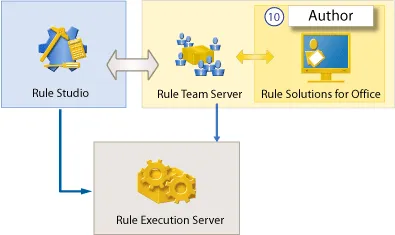
Rule Solutions synchronizes the changes made to a RuleDoc back to the environment from which the RuleDoc was published. Even if you change the organization of RuleDocs in a folder or move rules from one RuleDoc to another, your RuleDocs still sync back to their source.
Installing Rule Solutions for Office
- Once the installation of Decision Center is complete, you can manually run the installer for Rule Solutions.
- If you installed the product with Installation Manager, make sure that you selected the Rule Solutions for Office feature.
-
Navigate to
/Rule Solutions for Office/ - Double-click the RuleSolutionsForOffice.exe file to run it.
- Follow the steps in the installation wizard.
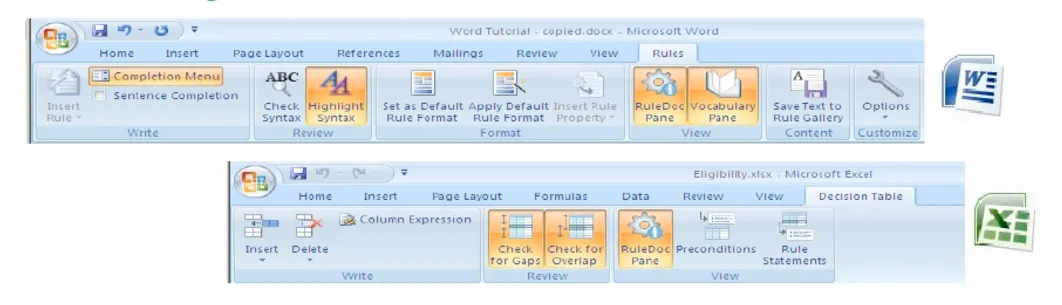
Rule Solutions for Office is an optional component that provides a way for business users to create and edit business rules in Microsoft Word or Excel. The Rule Solutions for Office feature in Installation Manager copies the installer for Rule Solutions for Office to your installation directory.
Happy Learning! Happy Exploring!!